 InspectCam™
Photos·
Good work deserves good documentation.
InspectCam™ is the flashlight camera app for trades, free on Android. One tap and the light stays on while you look, take photos and record video.
The camera and the light are free today. Project records are what Pro adds, with timestamps and geotags. Try Pro free for 30 days (US).
- Now onGoogle Play
- Coming soon to theApp Store
Free to use · No ads · Android
Select a feature to see the details
Free · No ads
Pro

One tap, light stays on


Free
Flashlight stays on with the camera
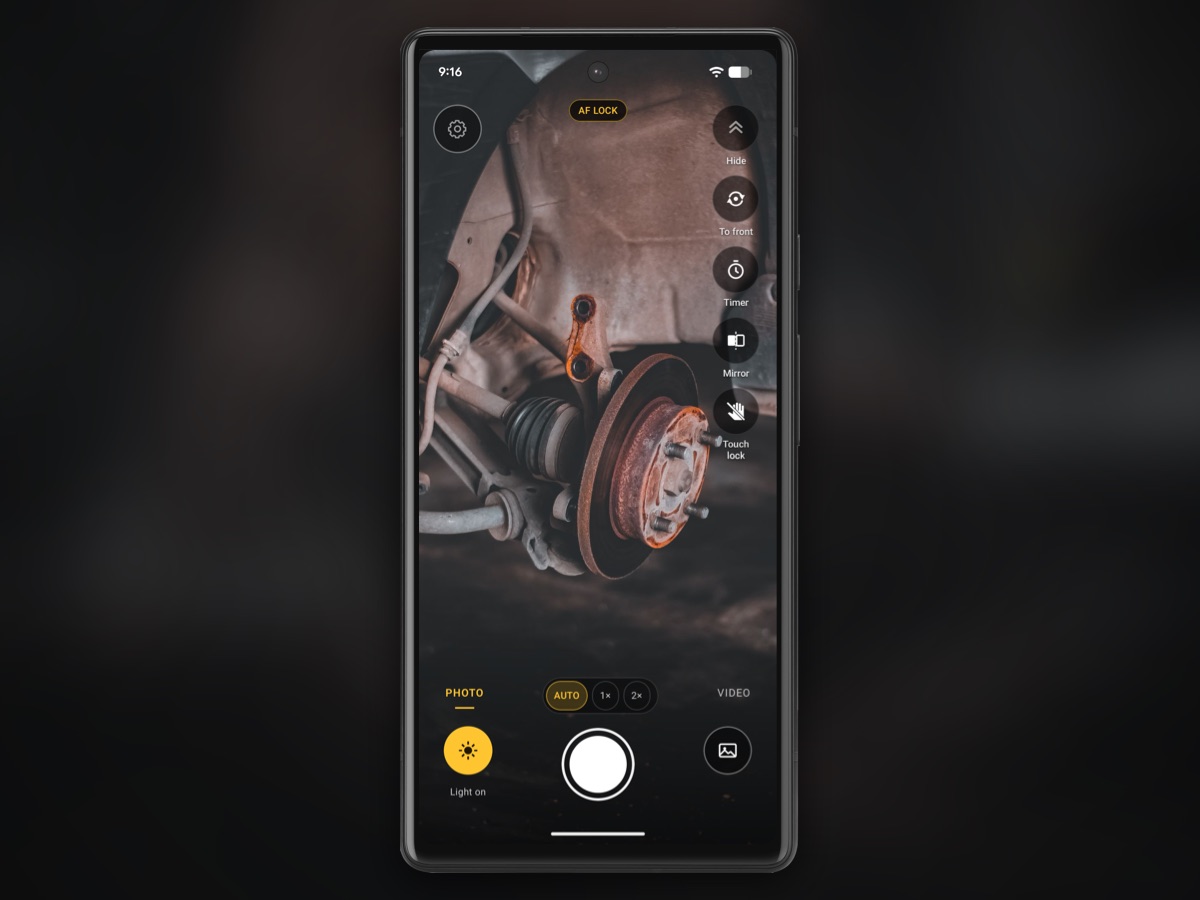
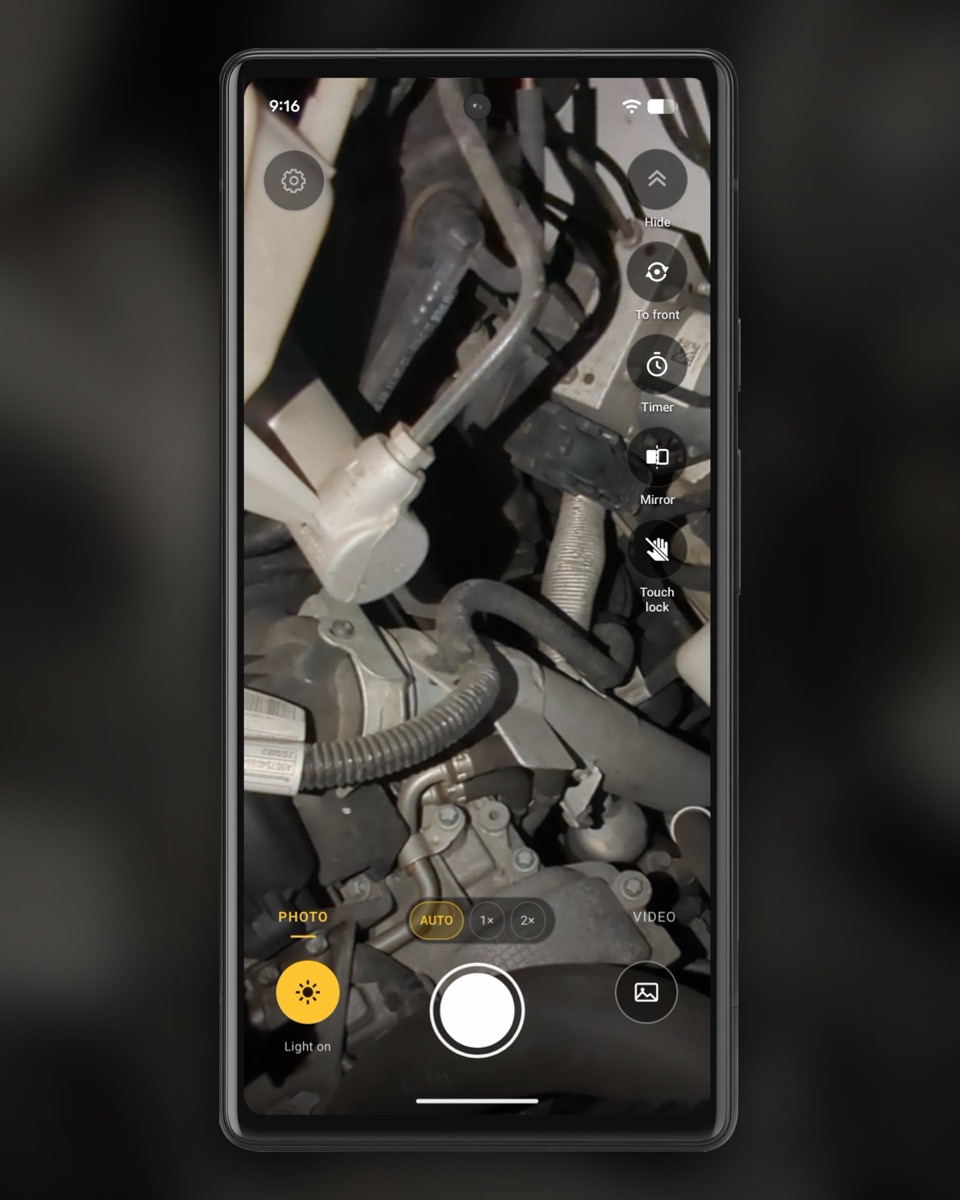
One tap and the light stays on while you look, take photos and record video. Find the leak, show the customer, record it.
Why the flashlight goes out in other camera appsFree
Phone level for roofs, decks and framing
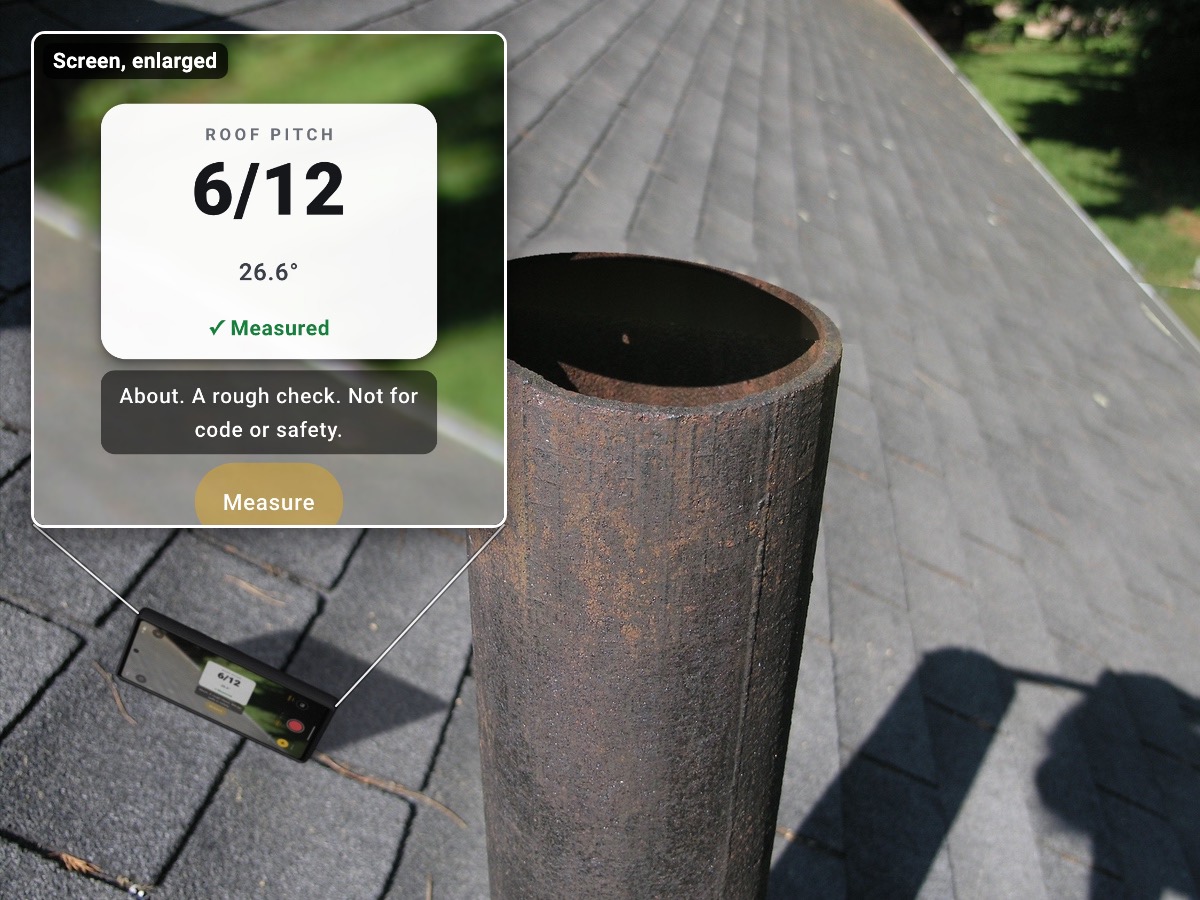
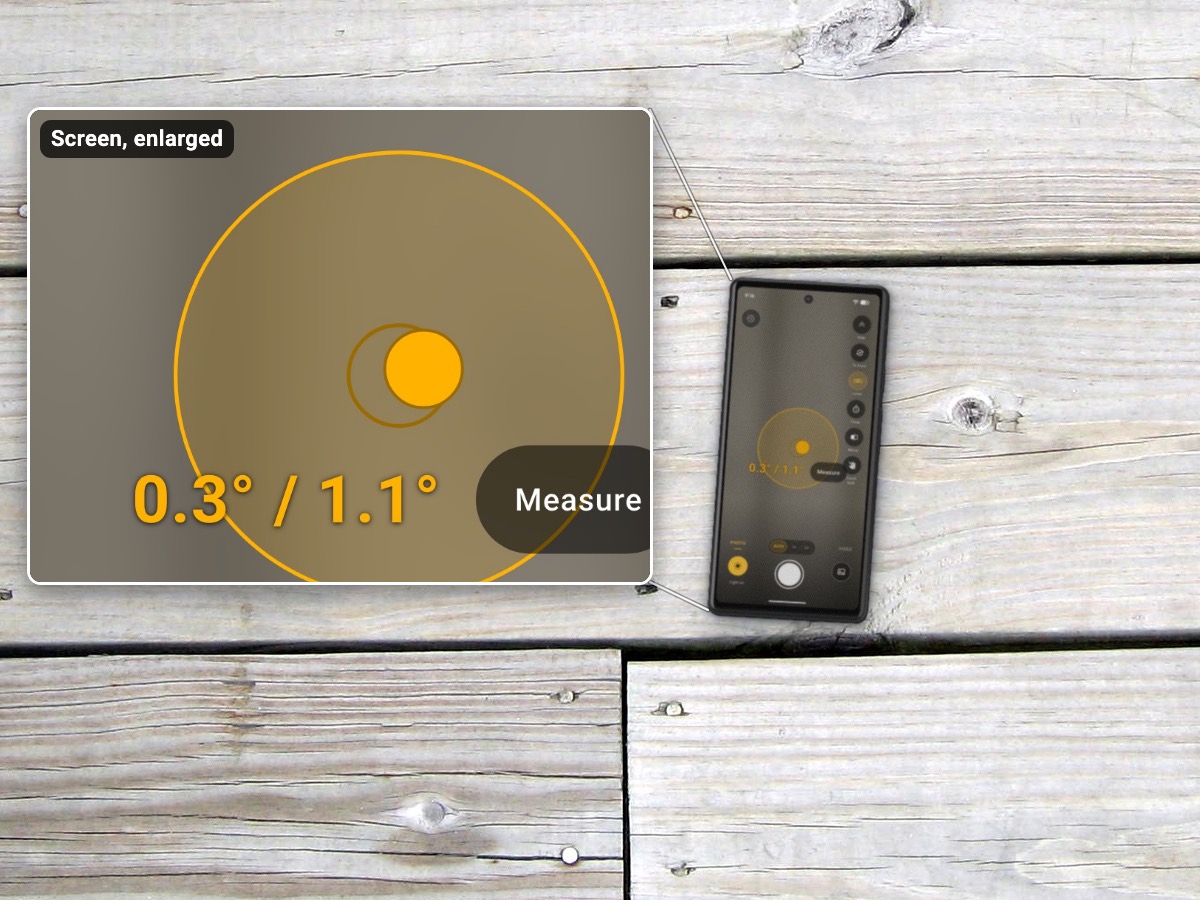
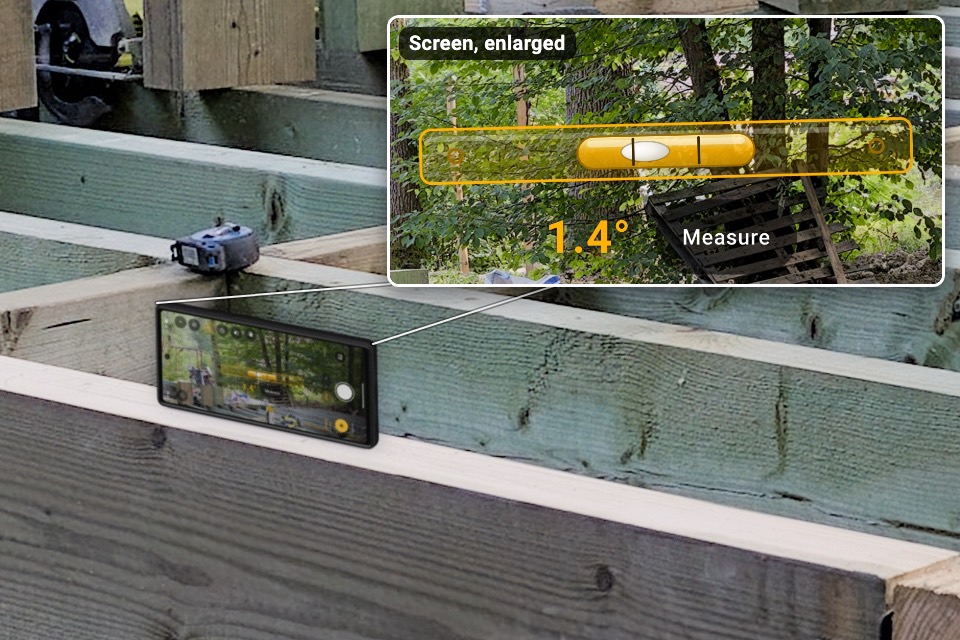
Stand the phone on its long side on a roof, a joist or a beam and it reads that side; on a roof, the pitch, like 6/12 (up to 12/12). In photo mode, tap Measure, put the phone's long side on the roof and hold still: it takes the first photo, then you step back for the proof photo, with a dotted true line and a card with the pitch. Lay it flat on a deck board for its slope. A rough check, not for code or safety.
A phone level that keeps the light onPro
Timestamps and geotags on photos
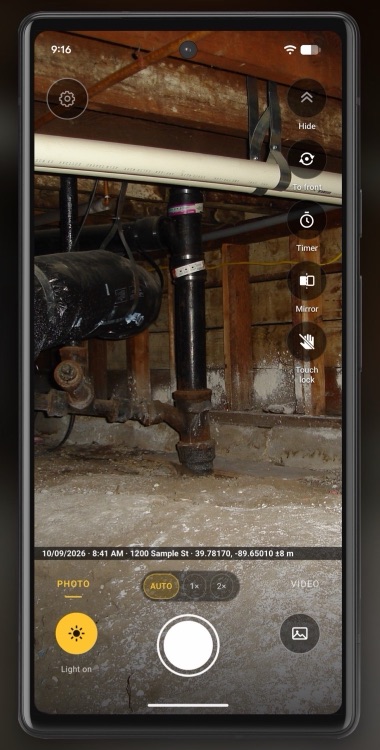
The date, time and place on photos and videos, in one line along the bottom. When a customer asks months later, it's on the picture. Coming soon: a company admin can hide the date, the time or the place.
The stamp is a record of when and where a photo was taken, not a certificate.
The timestamp camera app for contractorsPro
PDF photo reports under your name
Turn a job into a PDF under your company name, with a report number. Each photo prints with its date and time, and your note under it. Send it to the homeowner, tenant or insurer.
See everything Pro doesFree
Plug in a USB borescope
Where your hand won’t fit, plug a USB borescope into your phone. If InspectCam™ can show it, you see the scope’s picture, and take photos and video. Works with: Klein Tools ET16 (tested). Tested and doesn’t work: DEPSTECH NTC55, Bazo DN200 and a scope sold as “Industrial scope W400”; they only work with their maker’s app. Most scopes sold on Amazon won’t work. Tested on the Pixel 4a 5G and the Pixel 6a. If InspectCam™ can’t show your scope, it says so.
Does your phone support USB OTG?Pro
Notes and marks on your photos, with voice notes (coming soon)
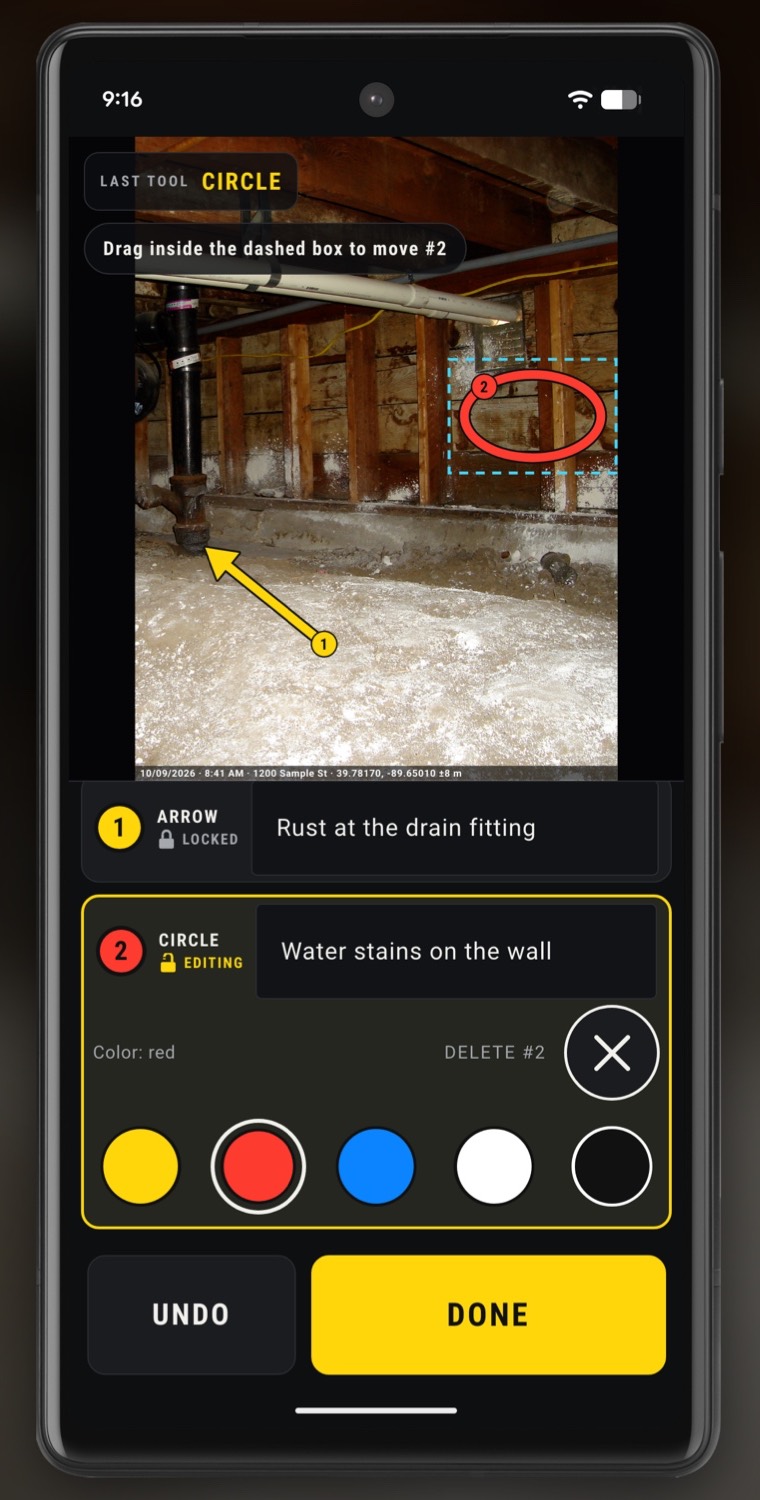
Type a note about a photo and draw numbered arrows and circles. Coming soon: hold Talk to leave a voice note that stays with the photo.
See everything Pro doesTeam & Business
Subs send photos, no app needed
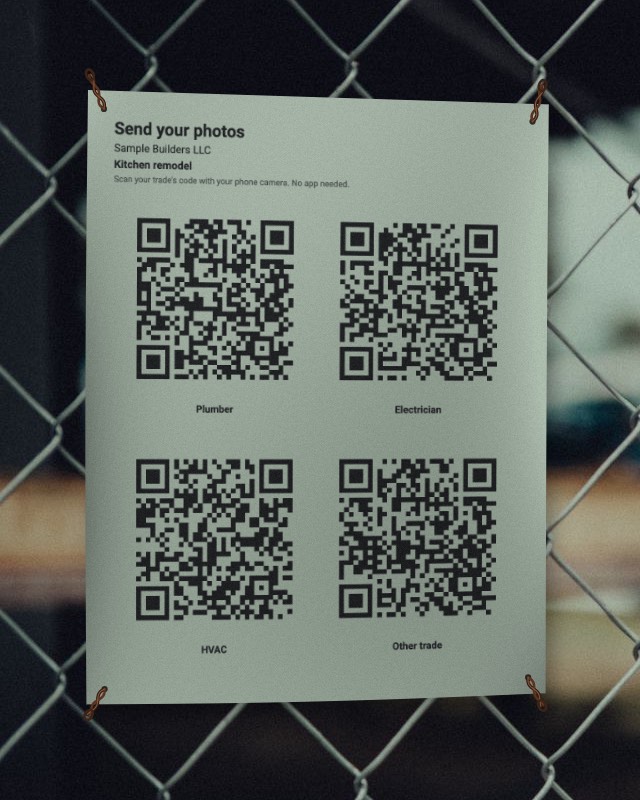
Text or email each trade their link. Your plumber or electrician sends photos from their phone’s browser into their own folder in your job. Coming soon: print one sheet of QR codes, one per trade.
See everything Pro doesFree
Front and back cameras at once
The job on the big screen, you in the small window. Show the problem and explain it in one video or photo, on phones that support it.
Why some phones can’t use both camerasFree
Selfie light: your screen lights your face
Recording a video update for the customer? Flip to the front camera and the screen turns white to light your face. Slide the Screen light bar to dim it.
Your selfie video is too darkStamp, enlarged

Free · No ads
A free utility app: flashlight camera, level, dual camera and scope. No ads.
InspectCam™ is an inspection camera app: one tap and the light stays on while you look, take photos and record video. Look into wall cavities, attics, crawl spaces and engine bays, then take the photo or the video.
-
Free
Flashlight stays on with the camera
One tap and the light stays on while you look, take photos and record video. Find the leak, show the customer, record it.
-
Free
Phone level for roofs, decks and framing
Stand the phone on its long side on a roof, a joist or a beam and it reads that side; on a roof, the pitch, like 6/12 (up to 12/12). In photo mode, tap Measure and put the phone's long side on the roof: it takes the first photo, then you step back for the proof photo with the pitch on it. Lay it flat on a deck board for its slope. A rough check, not for code or safety.
-
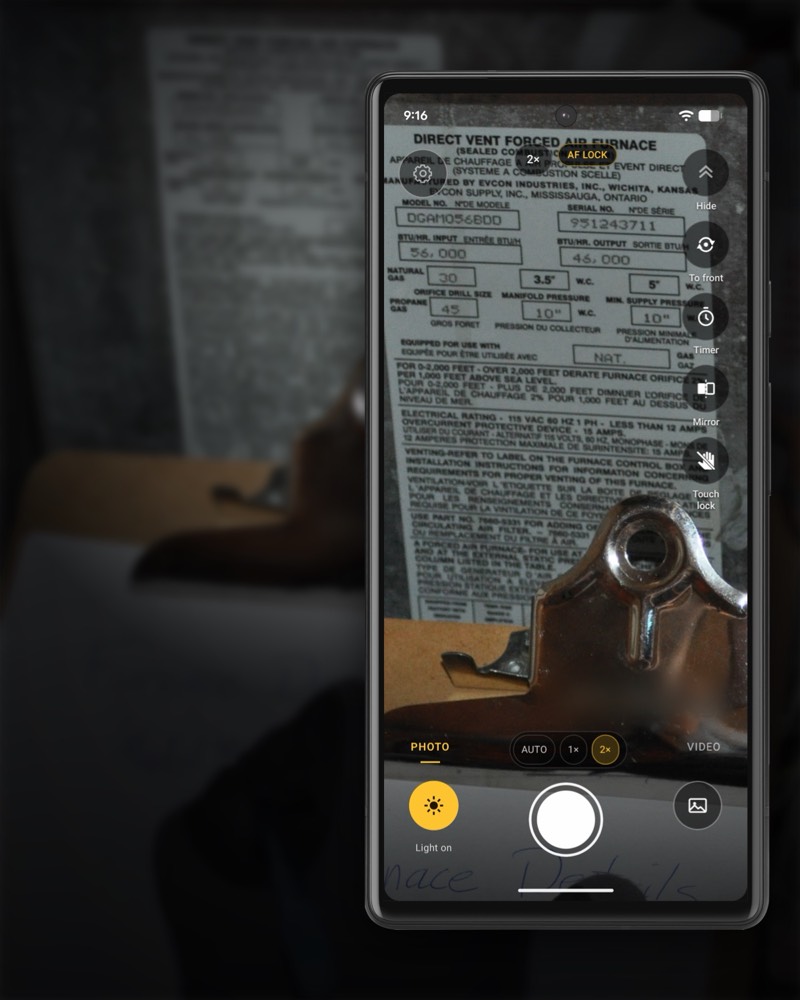
Free
Sharp data-plate photos in the dark
Furnace or water heater in a dark closet? Turn the light on once and it stays on: light up the model and serial plate, zoom in, tap to focus, then shoot.
-
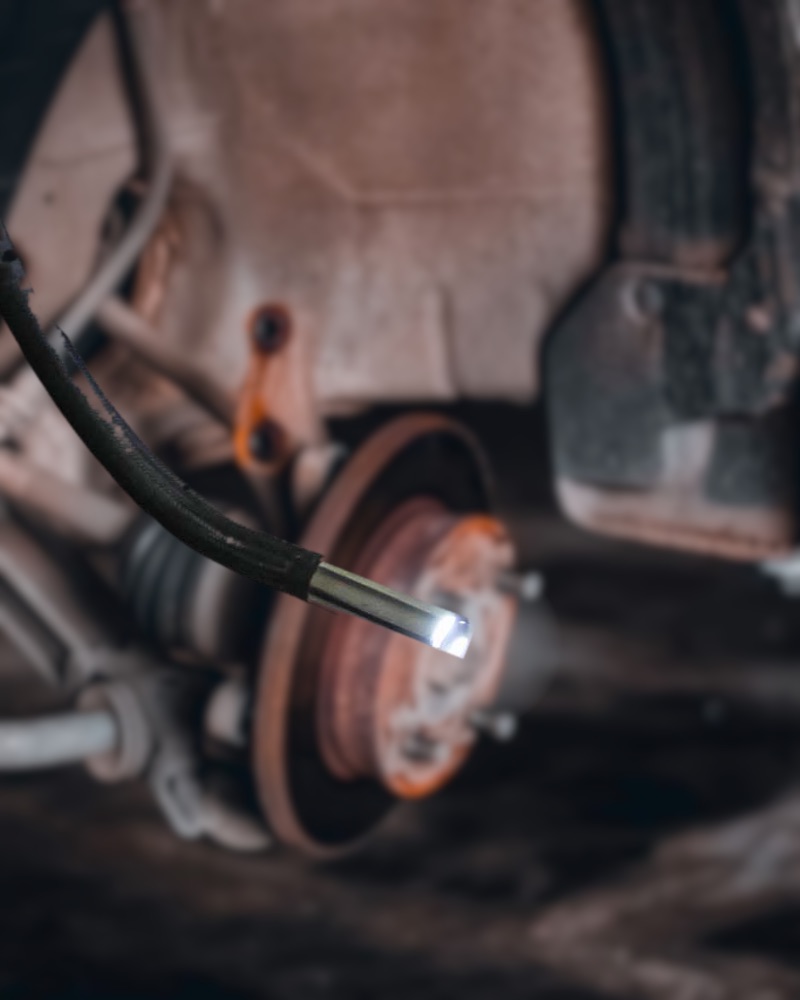
Free
Plug in a USB borescope
Where your hand won't fit, plug in a USB borescope. If InspectCam™ can show it, you take photos and video through it. Works with: Klein Tools ET16 (tested). Tested and doesn’t work: DEPSTECH NTC55, Bazo DN200 and a scope sold as “Industrial scope W400”; they only work with their maker’s app. Most scopes sold on Amazon won’t work. If your scope won't show, the app says so.
-
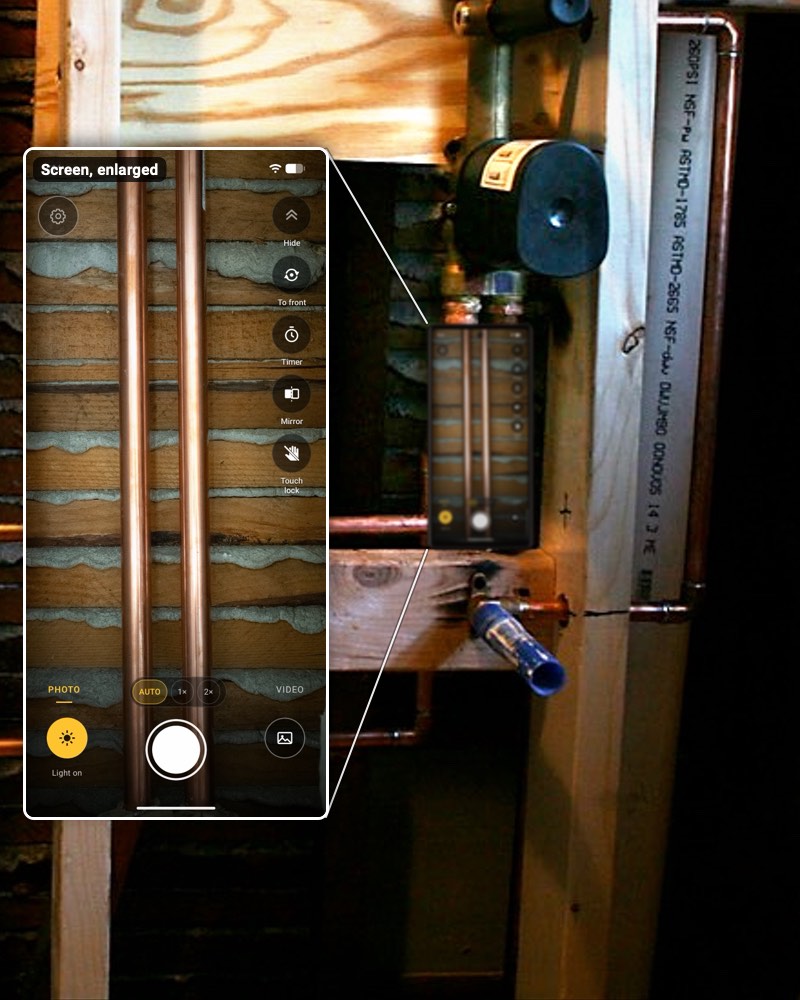
Free
Reach in and shoot with one hand
A 3- or 6-second timer, a volume-button shutter, and touch lock so a stray palm can't turn off the light. Big buttons, made for gloves. Plus a mirror, and a dimmer for the screen light and, on phones that support it, the LED.
-
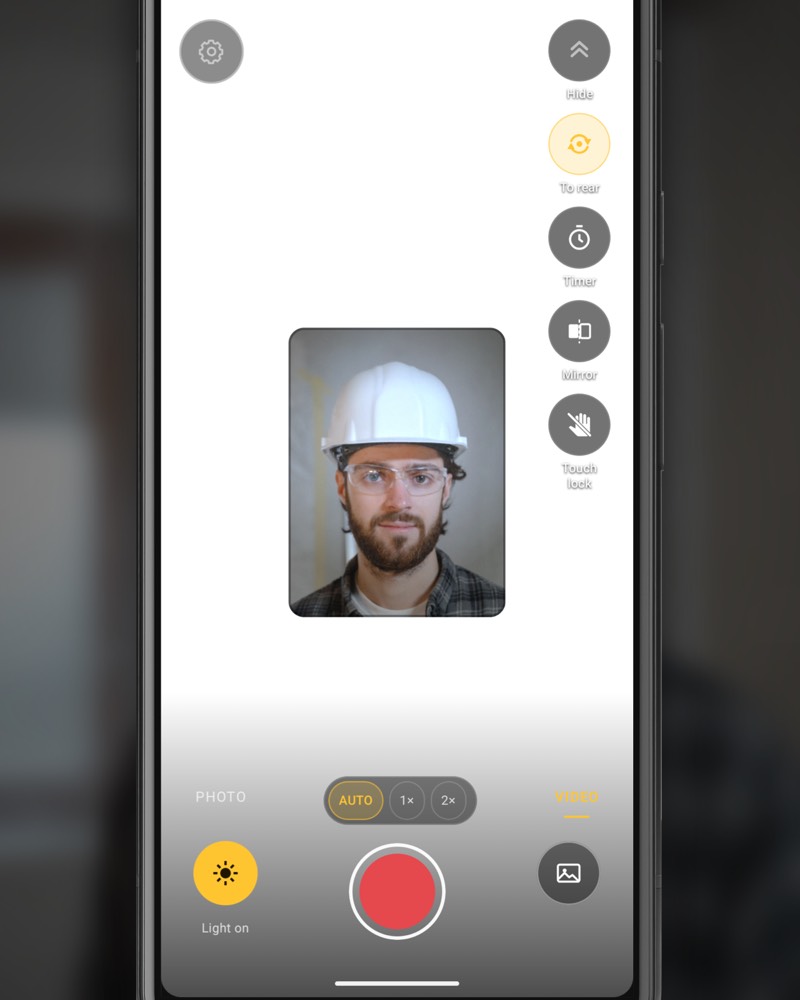
Free
Selfie light: your screen lights your face
Recording a video update for the customer? Flip to the front camera and the screen turns white to light your face.
-
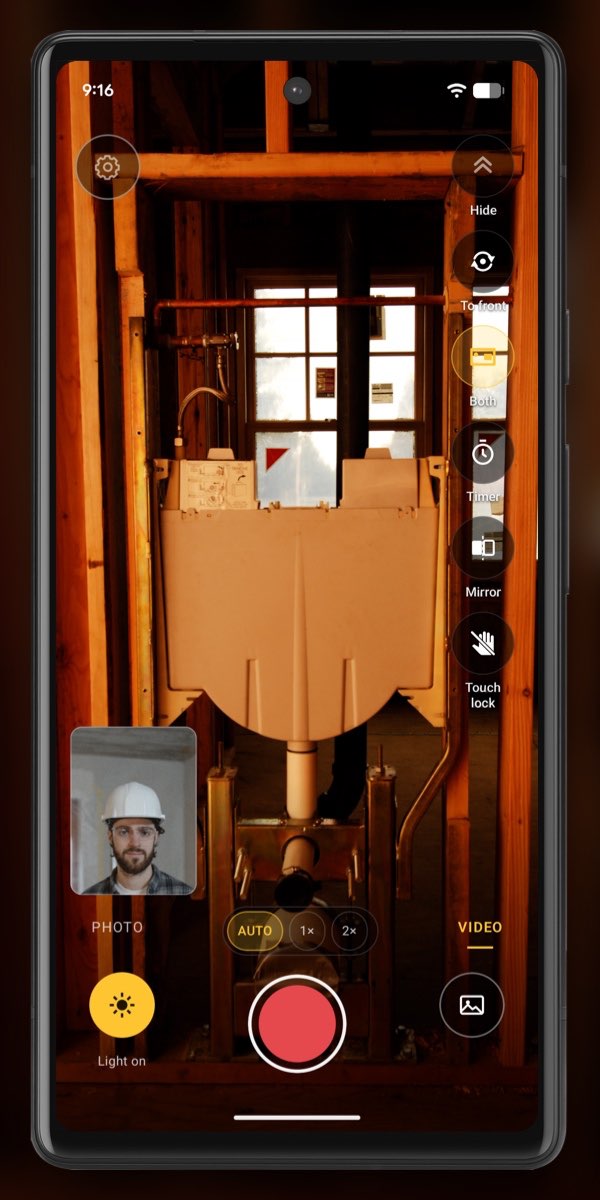
On phones that support it
Front and back cameras at once
Record what's in front of the lens and what's behind you on one screen, in photos and video. Drag the front camera's small window and pinch to size it. Videos show it where you put it.
-
Some tools need hardware that not every phone has: a light on the back, a light that dims, a wide lens, two cameras that run together, or the motion sensor the level reads. To save your battery, the light turns off after 10 minutes untouched, or if the phone gets very hot. Tap it to turn it back on. Free photos carry a small, faint InspectCam™ mark in one corner.


Using a borescope with your phone?
Plug a USB borescope into your phone and, if InspectCam™ can show it, you see the scope’s picture and take photos and video. Works with: Klein Tools ET16 (tested). Tested and doesn’t work: DEPSTECH NTC55, Bazo DN200 and a scope sold as “Industrial scope W400”; they only work with their maker’s app. Most scopes sold on Amazon won’t work. If InspectCam™ can’t show your scope, it says so. If a scope isn't being detected, the Android troubleshooting page works through the causes in order. On iPhone, start with why USB borescopes don't work there.
Pro · on Google Play (US)
Pro photo documentation for contractors and crews
For contractors, home inspectors and property managers. Pro files your photos and videos in the right job, with the date, time and place in one line along the bottom, and turns the job into a PDF report under your name. One price for the whole crew, from $39.99 a month for up to two people.

The stamp · Pro
Date, time and place in one line along the bottom.
-
Pro
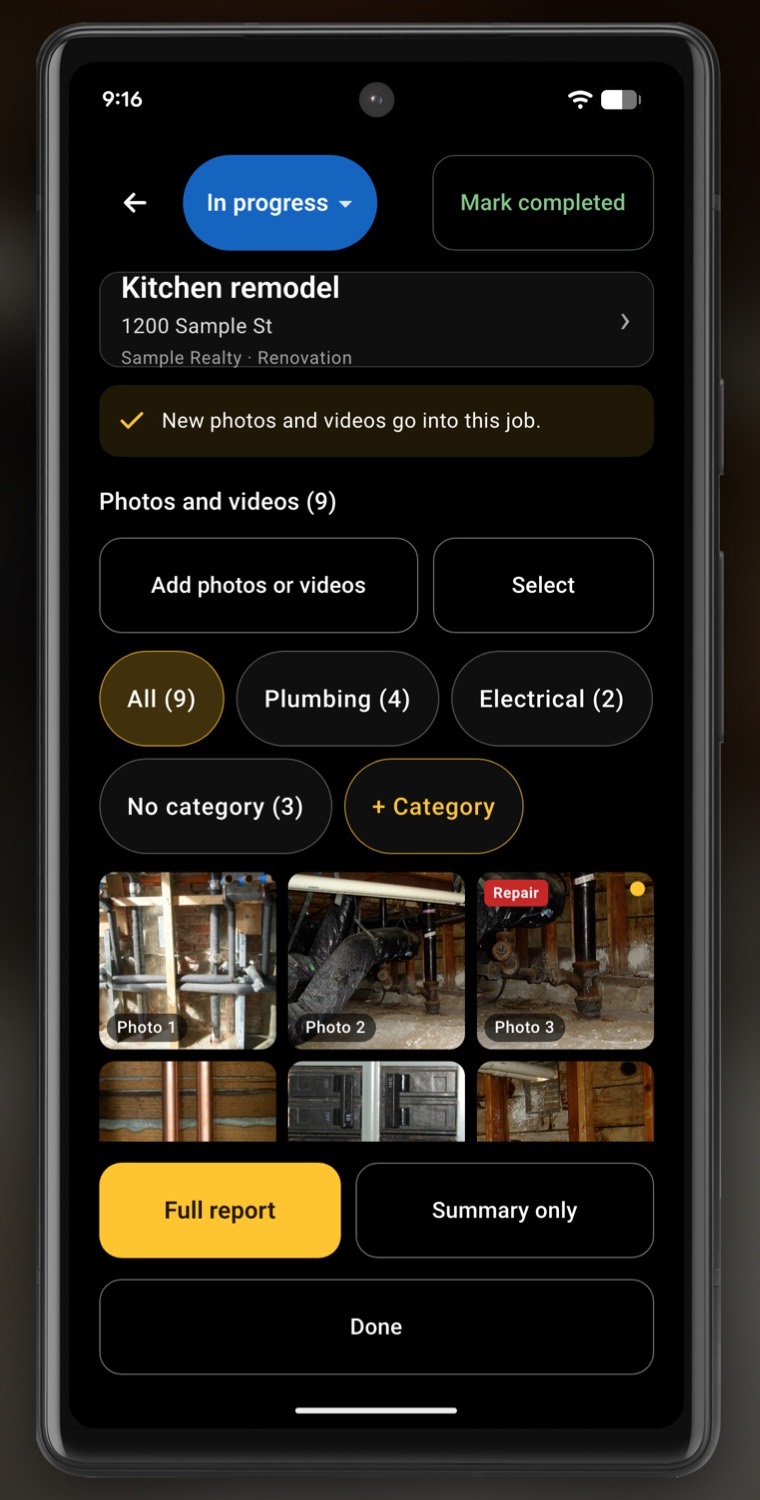
Photos land in the right job
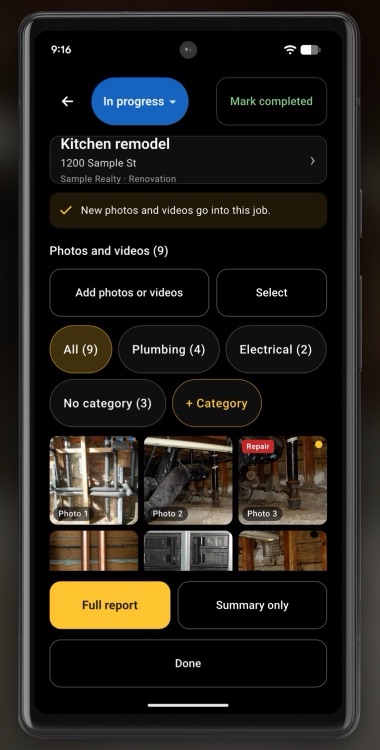
Put a job on the camera's job chip, and the photos and videos you take go into it. Ready-made templates for each trade, from roofing to home inspection. Sort photos by trade, like Plumbing or Electrical, and keep internal ones out of the report. At a job you've shot before, the camera picks it for you when it opens, with precise location allowed.
-
Pro
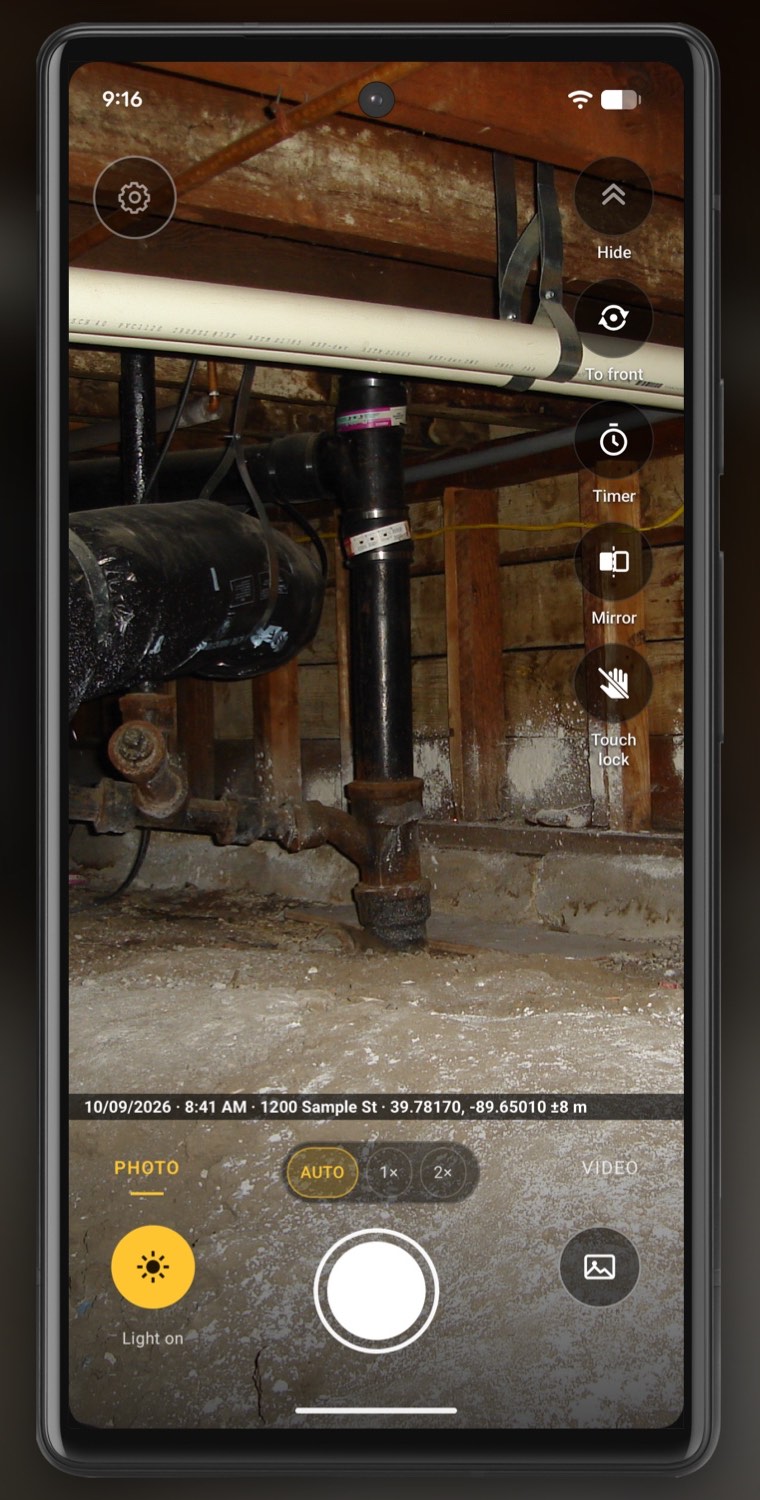
Timestamps and geotags on photos
The date, time and place on photos and videos, in one line along the bottom. When a customer asks months later, it's on the picture. Coming soon: a company admin can hide the date, the time or the place.
-
Pro
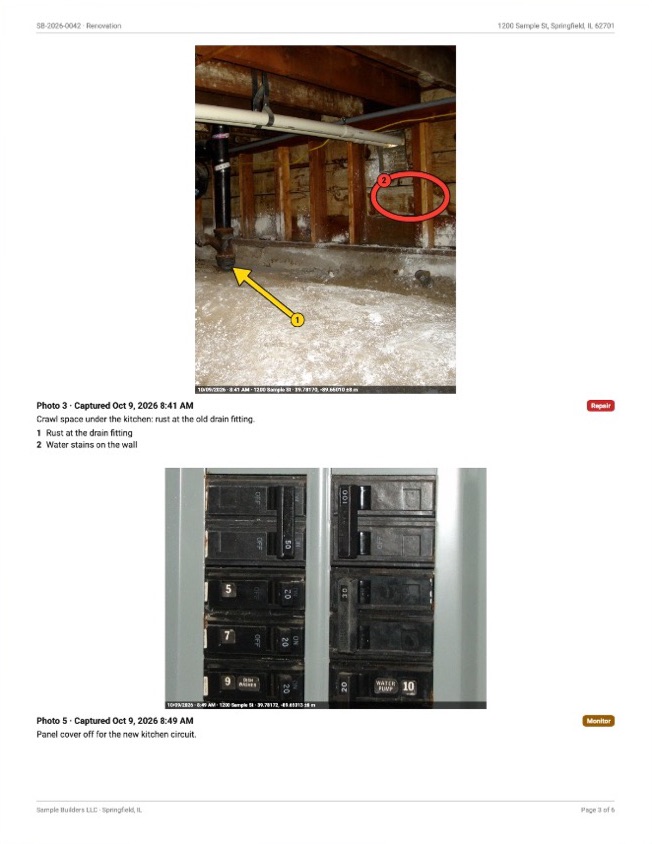
PDF photo reports under your name
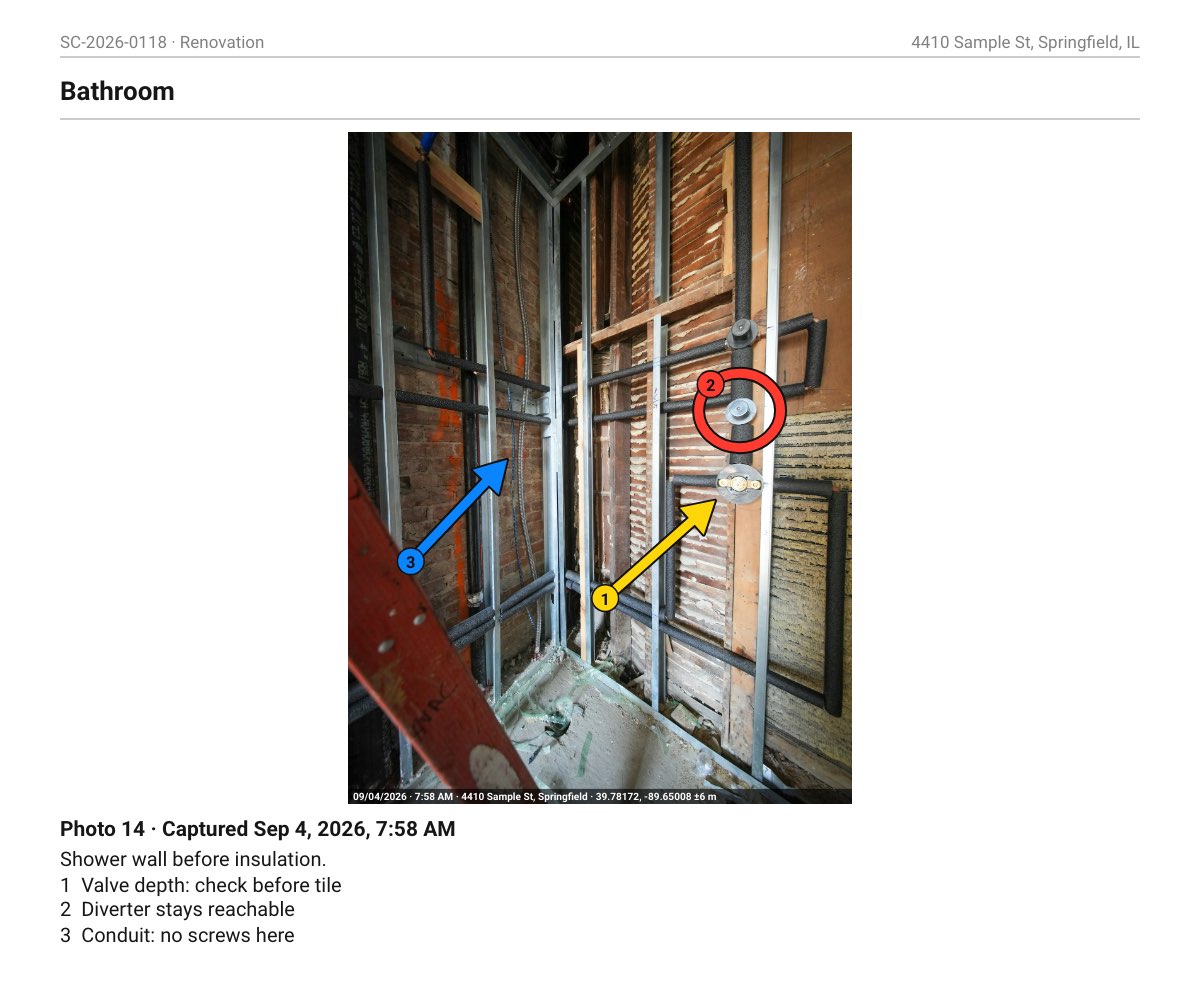
Turn a job into a PDF under your company name, with a report number. Each photo prints with its date and time, and your note under it. Send it to the homeowner, tenant or insurer. Pair two photos for a before-and-after page, the Before above the After.
-
Team & Business
Subs send photos, no app needed
Text or email each trade their link. Your plumber or electrician sends photos from their phone's browser into their own folder in your job. Coming soon: print one sheet of QR codes, one per trade.
-
Pro
Your crew on the same jobs (coming soon)
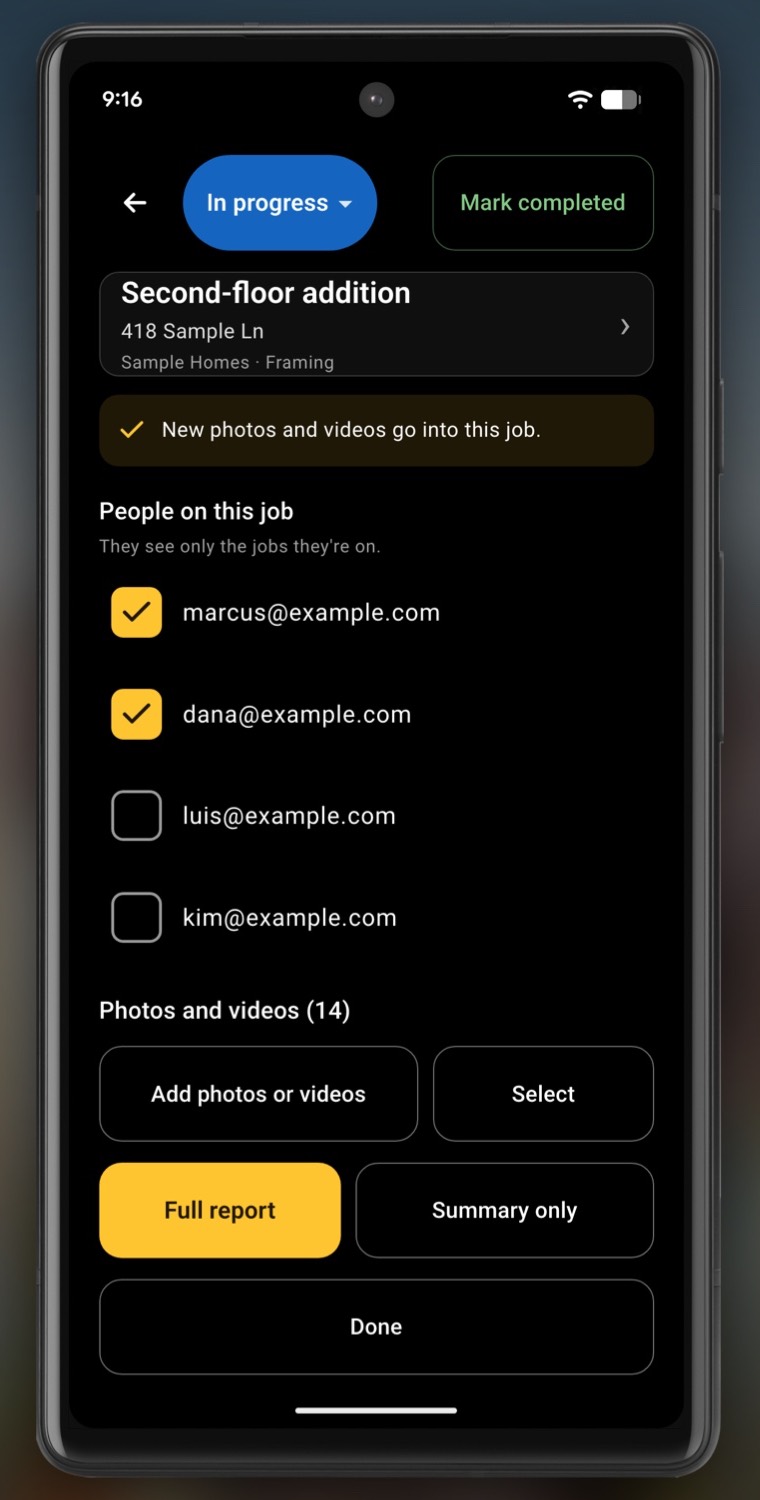
No signal? Photos upload later. Coming soon: your crew shoots into the same jobs from their own phones, synced; you get your files from any computer at files.inspectcam.app/files; and the office sees each photo during the day and what’s new, from small copies sent on mobile data too.
-
Pro
Send your client a link
Send your client a link to the report. The client’s page carries your company’s name and one small “Generated with InspectCam” line.
-
Pro
Mark up photos, or talk instead (voice notes coming soon)
Type a note under any photo or draw numbered arrows and circles. Coming soon: hold Talk and say it; the voice recording stays with the photo.
-
Pro on your crew's phones: Android · iPhone (Coming soon). Your subs and vendors send photos from their phone's browser, with no app to download. Coming soon: without location, the stamp shows the date and time, and videos recorded with both cameras carry no stamp. The stamp is a record of when and where a photo was taken, not a certificate.


How it works
A Pro account, from the shot to the report
The camera and the light are free. Everything below is what Pro adds. Pro is on sale in the US. Buy it in the app, through Google Play.
01 Pro
Start a job and shoot
Start a job from your trade’s template and shoot photos, with the light on.
02 Pro
Stamped
The date, time and place on photos and videos, in one line along the bottom.
03 Pro
Mark it up
Type a note or draw numbered arrows and circles. Coming soon: hold Talk and leave a voice note.
04 Pro
Filed in the job
Put a job on the camera’s job chip, and the photos you take go into it. Not the right job? Pick another. At a job you’ve shot before, the camera picks it for you when it opens, with precise location allowed.
05 Team & Business
Other trades add photos
Text a link. Your subs send photos from their phone’s browser, no app needed. Coming soon: print a QR sheet.
06 Pro
Export the PDF
One tap turns the job into a PDF report with your company’s name and report number. Send it to the customer, or send a link. Paired photos get a before-and-after page.


Pricing
One price for the whole crew, not per person.
Pro
$39.99
a month
Duo, up to 2 people
Every Pro tool except the trade photo drop, for you and one more person: jobs, PDF reports, customer signatures, the stamp, notes and arrows on photos, share links and cloud upload. Coming soon: crew sync and computer access.
$89.99
a month
Team, up to 5 people
Everything in Duo, plus the trade photo drop.
$159.99
a month
Business, up to 10 people
Everything in Team, for a bigger crew.
Duo
Up to 2 people
$39.99 a month
Team
Up to 5 people
$89.99 a month
Business
Up to 10 people
$159.99 a month
Jobs, PDF reports under your company’s name, cloud upload and share links. The camera stays free.
Team and Business add photo uploads from your subs and vendors by link, with no app for them to download (QR codes coming soon).
Duo and Team: pay yearly, $399.90 and $899.90, a year for the price of ten months. Business is monthly only.
A company’s first plan can start with a 30-day free trial.
The owner buys in the app. Everyone in the company gets Pro. The app is in English and Spanish.
US prices, plus any tax, charged by Google Play. Pro is sold in the US only. The free camera works in every country.
More than 10 people? Email support@inspectcam.app.
InspectCam™
Free
- The light stays on while you look, shoot and record
- A level on the camera: roof pitch, deck slope and plumb
- Plug in a USB borescope: works with the Klein Tools ET16 (tested)
- Read a data plate in a dark cabinet: zoom in, tap to focus, shoot
- Slide a finger up or down to brighten or darken the picture, on phones that support it
- Shoot one-handed: timer, volume-button shutter, touch lock
- Front and back cameras at once, on phones that support it
- Your screen lights your face for a video update to the customer
- Your music keeps playing — even while you record video
What it asks of you
- No ads
- The free version is fully usable on its own
Who it’s for
Pick your trade to see what you’d use.


Engine bays
Read a part number behind the block on the screen, with the light on. No third hand for a torch.
- FreeZoom in and tap to focus on a part number or a data plate.
- FreePlug in a USB borescope where your hand won’t fit. Works with: Klein Tools ET16 (tested). Most scopes sold on Amazon won’t work.
- ProFile the photos under the vehicle’s job and send the customer a PDF report.
Wall cavities and job sites
Checking a stud line or a cable run through a hole too small to look through.
- FreeThe light stays on while you look into the wall and record a short video.
- ProPhotos and videos filed in the job, with the date, time and place along the bottom.
- Team & BusinessSubs send photos in by link, no app needed (QR codes coming soon).
- ProA PDF report for the client, with your company’s name and report number.
Breaker boxes, attics and roofs
Tiny labels in a closet with no light. Pinch or tap a zoom preset to get close, then tap the label to focus.
- FreeThe phone level reads a roof’s pitch, as a rough check.
- ProA note, numbered arrows and circles on each photo; voice notes (coming soon).
- ProA PDF report under your company’s name, with a report number.
Under sinks
See the back of a trap or a shut-off valve in a cupboard with no light, or record a short video of the drip to show someone.
- FreeThe light stays on while you record the drip.
- ProA before-and-after page: the leak, then the repair.
- ProSend the homeowner the PDF report.
Crawlspaces and lofts
A light that stays on and a live view, so the phone goes where your head will not.
- ProStamped photos and video an adjuster can read: date, time, address and GPS.
- ProBefore and after on one page in the report.
- ProSend it to the insurer as a PDF.
Draw inspections
When a loan pays for the job in draws, each request needs photos tied to the budget.
- ProStart the job from the ready-made Draw inspection template (coming soon).
- ProA Draw inspection job carries the lender, loan and draw numbers (coming soon).
- ProA front-of-property photo at each visit, with the date, time and place on it (coming soon).
- ProA draw report as a PDF (coming soon).
Turnover cleans
Between tenants come the painter, the cleaner and the flooring crew, and what got done often arrives as a text.
- ProBefore and after photos of each room in one job, stamped.
- Team & BusinessSend your photos into the manager’s job by link, no app needed (QR codes coming soon).
- ProA PDF report the owner can read.
Turnovers between guests
Every turnover ends with the same question: was that there before?
- ProOne job per unit, with the date, time and place on its photos.
- ProBefore-and-after pairs for anything that changed.
- ProSend the owner a link to the report.
- Team & BusinessYour cleaner sends photos by link, no app needed (QR codes coming soon).
Proof of the work
Before and after photos, stamped, so the customer sees what you did.
- ProPick two photos and pair them: the report gives each pair its own page.
- ProAdd a note and numbered arrows; voice notes (coming soon).
- ProSend the customer a PDF report to back up your bill.
What's in each level
| Feature | Free | Pro |
|---|---|---|
| One tap and the light stays on while you look, take photos and record video | Yes | Yes |
| A level on the live camera: roof pitch, deck slope, plumb (a rough check, not for code or safety) | Yes | Yes |
| Measure prints the roof pitch on the photo | Yes | Yes |
| USB borescope: works with the Klein Tools ET16 (tested) | Yes | Yes |
| Zoom in and tap to focus on a data plate in the dark | Yes | Yes |
| One-handed: a 3 or 6 second timer, volume-button shutter, touch lock | Yes | Yes |
| Front and back cameras at once, in photos and video — on phones that support it | Yes | Yes |
| Your screen lights your face for a video update | Yes | Yes |
| Dim the light: the screen lamp on any phone, the rear LED on phones that support it | Yes | Yes |
| Mirror the picture to read a backwards label | Yes | Yes |
| Your music keeps playing — even while you record video | Yes | Yes |
| No ads | Yes | Yes |
| Photos land in the right job: by vehicle, unit or property | —No | Yes |
| Date, time, address and GPS on your photos and videos | —No | Yes |
| PDF reports under your company name, for a customer, tenant or insurer | —No | Yes |
| Typed notes and numbered arrows on your photos; voice notes (coming soon) | —No | Yes |
| Your crew on the same jobs, synced (coming soon) | —No | Yes |
| Crew photos reach the office (coming soon) | —No | Yes |
| Subs send photos by link, no app needed (Team and Business; QR codes coming soon) | —No | Yes |
Guides
Answers to the questions a store listing can't cover. Written by Andre Gaz, who builds the app.
-
Document water damage for insurance
The shots adjusters ask for, in order, before anything gets cleaned up.
-
Draw inspection checklist
What lenders want photographed per draw, so the money isn’t held up.
-
Photograph an HVAC data plate
Light, zoom and glare in a dark closet, and reading a faded plate.
-
Organize construction photos by job
One album per address, so the right photo turns up months later.
-
Annotate construction photos
Number it, point at it, say what to do. Then the crew fixes the right thing.
-
Prove the work was done
Before, during and after photos that answer for you in a dispute.
-
Move-in inspection checklist
Room by room, wide then close, so move-out photos match.
-
Borescope not detected on Android
Nine causes in order of likelihood. The cable is usually the answer.
-
Flashlight goes out when the camera opens
Why both platforms do it, and what actually keeps the light on.
-
Turn on the flashlight while recording video
Video, flash On, then record. And how to film a dark space so it shows.
-
Film the job and explain it in one video
The leak on the big picture, you saying what’s wrong in the small one. For quotes, adjusters and landlords.
-
Keep the flash on while taking a picture
Flash only lights the photo, so you aim in the dark. How to keep the light on while you line it up.
-
A phone level that keeps the light on
A level drawn on the live camera, so turning it on never turns your light off.
-
Check your crawl space without crawling in
What to look for from the access opening: standing water, mold, rot, termite tubes and torn sheeting.
-
Find a leak under the sink
When it drips tells you where: supply lines, faucet, drain or dishwasher. Then film it with the light on.
-
Your selfie video is too dark
Front flash fires for photos only. It does nothing for video.
-
Recording video stops your music
Audio focus, and the apps that never ask for it.
-
Why some phones can't use both cameras
The phone answers, not the app. No update adds it.
-
Wi-Fi scope keeps disconnecting
Your phone is leaving on purpose. The setting that stops it.
-
Does your phone support USB OTG?
A two-minute test that beats any checker app.
-
Which borescope specs matter
Focal distance decides sharpness. Most resolution figures are fiction.
-
USB borescopes and iPhone
The standard kind don't, and Apple's own documentation says why.
All guides, by topic

Get InspectCam™
- Now onGoogle Play
- Coming soon to theApp Store
InspectCam™ is on Google Play for Android. The iPhone app is coming soon, Pro included, with no date to promise yet.

.jpg)


