 InspectCam™
Comparison · Free on Android · Pro on Google Play (US)
Timemark alternative for job documentation
Timemark is a stamp camera: each photo can carry the time and place it was taken, and a team can collect everyone's photos in one space. It is free to start and used by field crews in many industries.

By , developer of InspectCam™ · Published · Last updated
InspectCam™ is a flashlight camera for trades. One tap and the light stays on while you look, take photos and record video, so the dark attic, crawl space or cabinet is lit before you take the photo. That camera, with a level and a USB scope view, is free on Google Play.
Pro, on sale in the US, turns those photos into a record of the job: jobs, PDF reports under your company name, share links and, on Team and Business, photos from your subs with no app to install. It puts the date, time and place on photos and videos taken into a job, in one line along the bottom, and you can type a note under a photo and add a numbered arrow or a circle. Coming soon: voice notes and your crew on the same jobs.
This page sets the two side by side, and says plainly where Timemark is the better fit.
Jump to
Side by side
| Feature | InspectCam™ | Timemark |
|---|---|---|
| Who it's for | Trades who work in dark, tight spots. Pro plans cover crews of up to 2, 5 or 10 people | Field teams in construction, fiber optic, cable and telecom, HVAC, property management, cleaning, security and more; its list of users adds delivery, retail, landscaping and roofing1 |
| Price model | The camera is free. Pro is priced per plan, by crew size: Duo, up to 2 people, $39.99 a month; Team, up to 5, $89.99; Business, up to 10, $159.99. Duo and Team can also pay yearly, $399.90 and $899.90, a year for the price of ten months; Business is monthly only. US prices, plus any tax, charged by Google Play. A company's first plan can start with a 30-day free trial | Per user. A free plan. Plus, for individuals: $5 a month or $49.99 a year, bought through the App Store or Google Play. Business: $7 a month or $60 a year per user2. Every member is a billable seat; monthly bills are prorated when people join or leave, and yearly plans prepay a set number of seats3,4,5. Enterprise: by quote6. Creating a team starts a free 14-day Business trial with no credit card7,8; yearly Plus carries a 7-day trial where it's offered9. These are US prices; the real price is set by country at checkout10 |
| Free camera | Yes. Free on Google Play, no ads. Free photos carry a small, faint InspectCam™ mark in one corner | Yes: unlimited photos with the stamp, and no account needed to take them. The Free plan shows ads and puts a small Timemark logo in a corner of each photo; Plus and up remove both8,10 |
| Light stays on | Yes. One tap and the light stays on while you look, take photos and record video. To save battery it turns off after 10 minutes untouched or if the phone gets very hot; tap it to turn it back on | Not listed |
| Level and roof pitch | Yes, free. Held up, a silver bar with three vials; lying flat, a ring. Roof pitch like 6/12 (up to 12/12), plumb, and Measure for a proof photo with the pitch on it. A rough check, not for code or safety | Not listed. The stamp can show a compass11 |
| USB borescope | Yes, free. Works with: Klein Tools ET16 (tested). Tested and doesn't work: DEPSTECH NTC55, Bazo DN200 and a scope sold as “Industrial scope W400”; they only work with their maker's app. Most scopes sold on Amazon won't work | Not listed |
| Time and location stamp | Pro. The date, time, street address and GPS coordinates the phone reports, in one line along the bottom of photos and videos taken into a job. A record of when and where the phone says a photo was taken, not a certificate. Coming soon: the location written into the file too | Free. Time, location, GPS coordinates, map, compass and more, on the photo, with the time and location also written into its metadata11. Network-verified time and a Photo Code on each photo; anyone can check a photo free at verify.timemark.com, without the app, on Free, Plus and Business8,12 |
| Jobs | Pro. Pick the job you're on and every photo and video files into it. Each job keeps its client and address on one card. With precise location allowed, the camera opens on the job you've shot at this spot before, marked “Near here”, and asks “Which job?” when two or more jobs share the spot | Projects in Teamspace. Free and Plus: 3 projects and 100 photos; Business: unlimited projects and 300,000 photos10. Every 10 seconds of video counts as 1 photo2 |
| Reports under your name | Pro. One tap turns a job into a PDF under your company's name, with a report number. Each photo prints with its date and time and its note, and one small “Generated with InspectCam” line goes on the last page. Group photos into findings, each with a severity and a recommendation, and the PDF becomes an inspection report: a Summary of Findings, a table of contents and a numbered card for each finding with its photos. Or make a summary-only version, with no photo pages. Coming soon: a closing page in your company's own words | PDF, Excel, collage, ZIP, KMZ (Google Earth) and share links. Free: 5 exports of each type, and no collage; Plus and Business: unlimited13. PDFs carry your company logo14; a Teamspace PDF made on the web can add a cover, an overview, a map and fields for each photo, on Free and Business15 |
| Share with the client | Pro. Send a share link: the client sees the report in the browser and can download the PDF. Stop sharing takes the link down | Clients and inspectors view photos through a live link, with no app to download1. Anyone with a Teamspace link can view and download the photos without a Timemark account, and those links don't expire by default16; links made from the app's own Tools, outside Teamspace, expire after 30 days by default17 |
| Markup and notes | Pro. Type a note under a photo, and it prints under the photo in the report; numbered arrows and circles, a choice of five colors, and a line for what each number means, with the original photo kept as it was. Coming soon: text labels; hold Talk for a voice note that stays with the photo | Rectangles, circles, arrows, text and freehand brush, in Teamspace; marked-up photos still pass verification18. Voice notes are not listed19 |
| Checklists and signatures | Pro. Job templates with shot lists for your trade: the camera shows the next shot, and the job page shows what's still needed. With the Restoration and Property manager templates, the customer signs a work authorization or a certificate of completion on the phone, with a finger, and the report gives each signed one its own page with the full wording, the signer's name and the date and time | Checklists with signature steps (the signature with a system timestamp, and the signer's name when the step asks for it), exported to PDF, Excel or a link. They need a Teamspace and aren't tied to a paid plan20 |
| Subs send photos | Team and Business. A link for each trade (QR codes coming soon). Subs send photos from their phone's browser into their own folder in your job, with no app and no account | Subcontractors join as team members, and on a paid plan each one is a billable seat21,4. Team members can also upload photos and videos on the Teamspace website, from a computer's browser22. No way for someone outside the team to send photos is listed |
| Backup and other apps | Pro. Photos, videos and reports of company jobs upload to your company in the cloud. Coming soon: reports and small copies of the photos go up on mobile data too; full-size photos and videos wait for Wi-Fi unless you allow mobile data. Coming soon: download them from a computer | Plus and up: auto backup to OneDrive and Google Drive. Business and up: Google Drive and SharePoint for the team, and webhooks2,23. A Jobber integration files photos to the matching request, quote or job; its plan isn't listed23 |
| Platforms | Android. The iPhone app is coming soon, with Pro included. Pro is on Android, so for now everyone on the crew needs an Android phone; subs on Team and Business need neither, they use the browser | Free on iPhone and Android, with Teamspace on the web24. The App Store app is iPhone only, not iPad25. Works offline, in 20+ languages1 |
What you can do today, free
One tap and the light stays on while you look, take photos and record video. See the spot, tap to focus, then take the photo or the video. The same camera has a level: held up, a silver bar with three vials; lying flat, a ring. It reads roof pitch like 6/12 (up to 12/12) and plumb, and Measure takes a proof photo with the pitch on it. A rough check, not for code or safety. There's a USB borescope view for the Klein Tools ET16, and both cameras at once, in photos and video, on phones that support it. A timer, touch lock, a mirror and a volume-button shutter help when you reach in with one hand. No ads. Your music keeps playing — even while you record video.
- How to check a crawl space with your phone
- How to find a leak under the sink
- A phone level that keeps the light on
- Which borescopes work
What Pro adds
Pro is on sale in the US, inside the same app. The owner buys it in the app, through Google Play, and everyone in the company gets Pro. A company's first plan can start with a 30-day free trial.
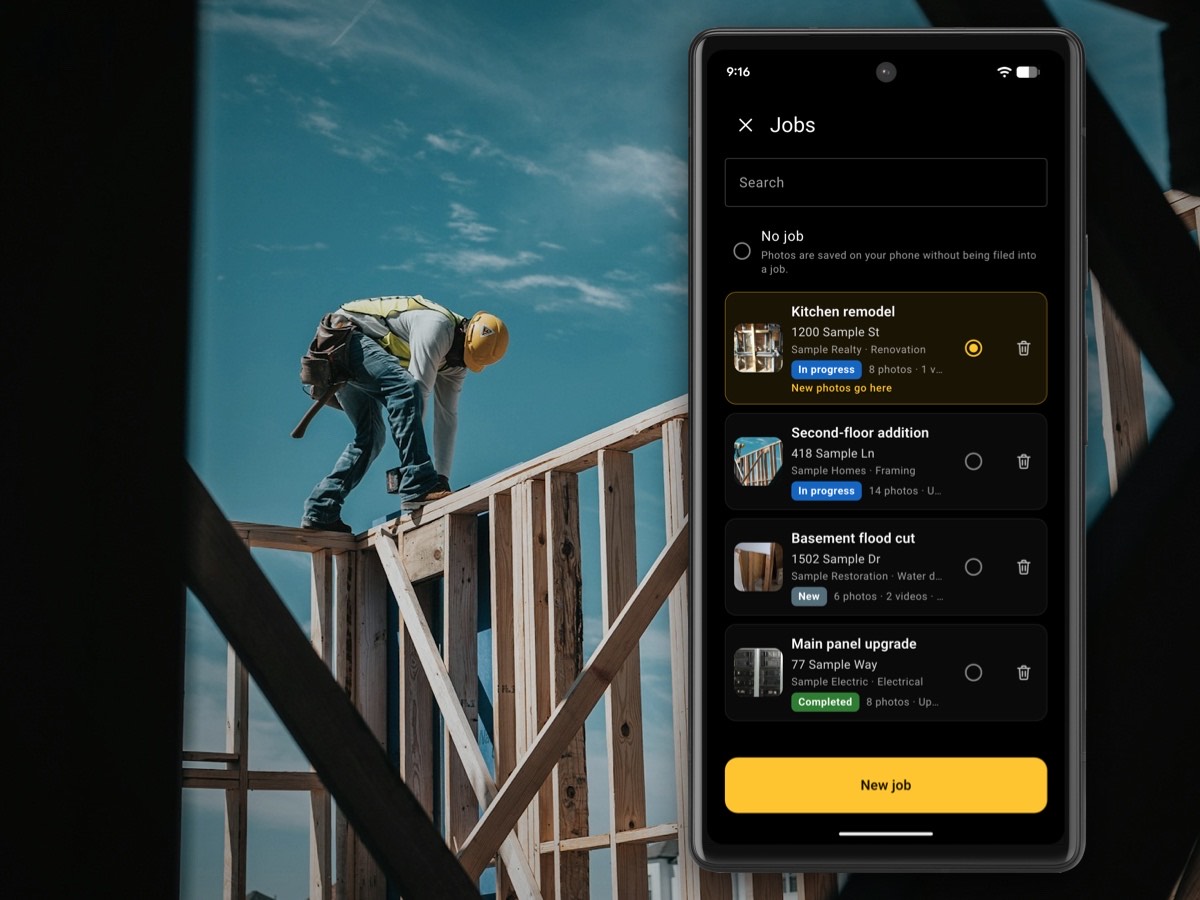
Pick the job you're on, and every photo and video you take files into it, with the client and address on the job's card. One tap turns the job into a PDF report under your company's name, with a report number, or a share link your client opens in the browser. Company jobs upload to the cloud. On Team and Business, your subs send photos into the job from a link (QR codes coming soon), with no app and no account.

Photos and videos taken into a job carry the date, time and place in one line along the bottom. Type a note under a photo, or add a numbered arrow or a circle and say what it shows. Start a job from a template for your trade, and the camera shows the next shot on its list. With the Restoration and Property manager templates, your customer signs a work authorization or a certificate of completion on your phone. Write up what you found as findings, each with a severity, what it means and a recommendation, and the report lists them in a Summary of Findings. Coming soon: voice notes and your crew on the same jobs from their own Android phones. Everything Pro does is on the Pro page.
Pro by trade: home inspection, rentals, construction, water damage, roofing, mold remediation.
Who should pick which
Timemark is the better fit if:
- You need a time and location stamp today, free. Timemark stamps photos on its free plan, with no account. InspectCam™'s stamp is part of Pro, on photos and videos taken into a job.
- Your photos have to stand up as proof of work. Timemark checks the time against the network and gives each photo a code anyone can check free on its site. InspectCam™'s stamp records what the phone reports, and we call it a record, not proof.
- You need checklists with signature steps. Timemark has checklists with signature steps, not tied to a paid plan. InspectCam™ Pro has shot lists, and its signatures come with the Restoration and Property manager templates: a work authorization and a certificate of completion.
- You pay by the person: one person on a plan of their own (Plus is made for individuals; InspectCam™ Pro has no one-person plan), a crew of more than 10, or a crew that changes with the season, with monthly bills prorated as people join or leave.
- You export to Excel or Google Earth (KMZ), or connect Google Drive, OneDrive, SharePoint or Jobber.
- Your crew is on iPhones, or works in a language other than English. Timemark runs on iPhone and Android and lists more than 20 languages. The InspectCam™ iPhone app is coming soon, with Pro included.
InspectCam™ is the better fit if:
- Much of your work is in the dark: attics, crawl spaces, panels, under sinks, behind appliances. One tap and the light stays on, so you aim and focus in light before the shot.
- You want the tools in the camera: a level, roof pitch, plumb and Measure, and a USB borescope view, free.
- Your subs won't join another team app. On Team and Business, they open a link (QR codes coming soon) and send photos from the browser, with no app and no account.
- You'd rather pick a plan by crew size (up to 2, 5 or 10 people) than count seats.
- You write up what you found, not only what you shot. Pro's report carries your company name and a report number, with each photo's date and time, the note under it, and numbered arrows with what each one means. Start from a template for your trade, and the report carries its fields and room headings. Add findings with a severity and a recommendation, and each one gets a numbered card in the report.

Questions people ask
Can I get InspectCam™ Pro now?
Yes, in the US. Buy it in the app, through Google Play. A company's first plan can start with a 30-day free trial. Pro runs inside the free InspectCam™ camera for Android. Pro is sold in the US only. The free camera works in every country.
Does the free InspectCam™ camera stamp the date and location?
No. The stamp is part of Pro: the date, time and place in one line along the bottom of photos and videos taken into a job. Free photos carry a small, faint InspectCam™ mark in one corner. If a free stamp is all you need today, a stamp camera such as Timemark does that.
Is the InspectCam™ stamp proof of when I was there?
The stamp shows the date, time, street address and GPS coordinates the phone reports when the photo is taken. It's a record of the job, not a certificate, and we don't call it proof. Whether it settles a dispute is up to whoever you show it to. What a stamp shows, and what it doesn't prove, is on the timestamp camera app page.
How is Pro priced, next to Timemark?
Pro has three plans by crew size: Duo, up to 2 people, $39.99 a month; Team, up to 5, $89.99; Business, up to 10, $159.99. Duo and Team can also pay yearly, $399.90 and $899.90; Business is monthly only. US prices, plus any tax, charged by Google Play. A company's first plan can start with a 30-day free trial. More than 10 people? Email support@inspectcam.app. Timemark charges per user: Plus $5 a month or $49.99 a year, Business $7 a month or $60 a year, and Enterprise by quote. Creating a Timemark team starts a free 14-day Business trial. Those are the US prices Timemark listed on 24 Oct 2026; it sets the real price by country at checkout.
Does my whole crew need Android phones?
For now, yes. Pro is in the Android app. The iPhone app is coming soon, with Pro included. On Team and Business, your subs need neither: they send photos from any phone's browser.
Do my subcontractors need an account?
No. On Team and Business, each trade gets a link for the job (QR codes coming soon) and sends photos from the browser, with no app and no account.
Does Pro need an account?
Yes. Pro uses an account so your jobs belong to your company. You sign in with Google.
Which borescopes work?
Works with: Klein Tools ET16 (tested). Tested and doesn't work: DEPSTECH NTC55, Bazo DN200 and a scope sold as “Industrial scope W400”; they only work with their maker's app. Most scopes sold on Amazon won't work. The full list is on Works with.
Sources
Timemark facts. All checked 25 October 2026. Timemark is a trademark of its owner. InspectCam™ is not affiliated with or endorsed by Timemark.
- Timemark on Google Play, “Timemark: Photo Proof for Work” by OG Co. (who it's for, live links without an app, offline, 20+ languages; 4.7 stars, 978K reviews; 10M+ downloads; updated Oct 24, 2026)
- Timemark pricing page, plan cards and plan data (yearly prices read from the page's plan data, with the yearly toggle; Plus and Business card features; FAQ: “Every 10 seconds of video counts as 1 photo”)
- Timemark FAQ (Business billed per member, prorated mid-cycle)
- Timemark help, “Upgrade to Business” (“Every existing member becomes a billable seat at upgrade”; no minimum stated)
- Timemark help, “Billing cycle” (yearly Business prepays seats; a removed member's seat is not refunded but can be reassigned)
- Timemark help, “Enterprise plan availability” (sales-led, not self-serve; “Enterprise pricing is quote-based”)
- Timemark help, “Create a team” (“Creating a team starts a free 14-day trial. No credit card is required”)
- Timemark, “Capture photo proof” (Free-plan logo in a corner, no account needed, unlimited photos, 14-day Business trial without a credit card)
- Timemark help, “Upgrade to Plus” (7-day free trial on yearly Plus where offered)
- Timemark help, “Plans comparison” (Teamspace projects and photo limits, “No ads” row, US prices as the reference, real price by country at checkout; page last updated 24 Sep 2026)
- Timemark help, “What is Timemark?” (stamp fields: time, location, GPS coordinates, map, compass; written into metadata)
- Timemark help, “Verify a photo” (verify.timemark.com, no app needed; Free, Plus and Business; page last updated 15 Oct 2026)
- Timemark help, “Generate reports” (PDF, Excel, collage, ZIP, KMZ, link; 5 of each on Free; collage needs Plus; page dated 24 Sep 2026)
- Timemark, photo reports feature page (“Every PDF comes with your company logo”)
- Timemark help, “Export as PDF” (Teamspace PDF with uploaded logo, cover, overview, map, per-photo fields; Free and Business)
- Timemark help, “Export as link” (anyone with the link can view and download, without a Timemark account; links don't expire by default, with an optional 7-day expiry in the App; Free and Business; page last updated 24 Sep 2026)
- Timemark help, “Share photos via link” (app Tools: anyone with the link can view and download, no app needed; “Links expire after 30 days by default”; 5 link exports on Free; page last updated 24 Sep 2026)
- Timemark, “Photo markup” (rectangles, circles, arrows, text, freehand brush, in Teamspace; annotated photos still pass verification)
- Timemark help index: no voice or audio feature listed there, on timemark.com, or on the Play or App Store listings
- Timemark, “Checklist” (signature steps with signer name and system timestamp; export to PDF, Excel or link; needs a Teamspace)
- Timemark, “Auto-collect job photos” (“Bring crew and subcontractor photos together by inviting members to your team”)
- Timemark help, “Upload photos to Teamspace” (any member, in the App or on the web, Free and Business; uploads from another camera carry no watermark or Photo Code; page last updated 17 Oct 2026)
- Timemark help, “Team integrations” (Google Drive, SharePoint, Jobber, webhook)
- Timemark download page (“Free for iPhone and Android”; Teamspace at teamspace.timemark.com)
- Timemark on the App Store, id6446071834 (“Only for iPhone”; 4.8 stars, 16K ratings; version 10.0.290). Not “Timemark: Timestamp Camera” (id6760217016), a different developer's app